
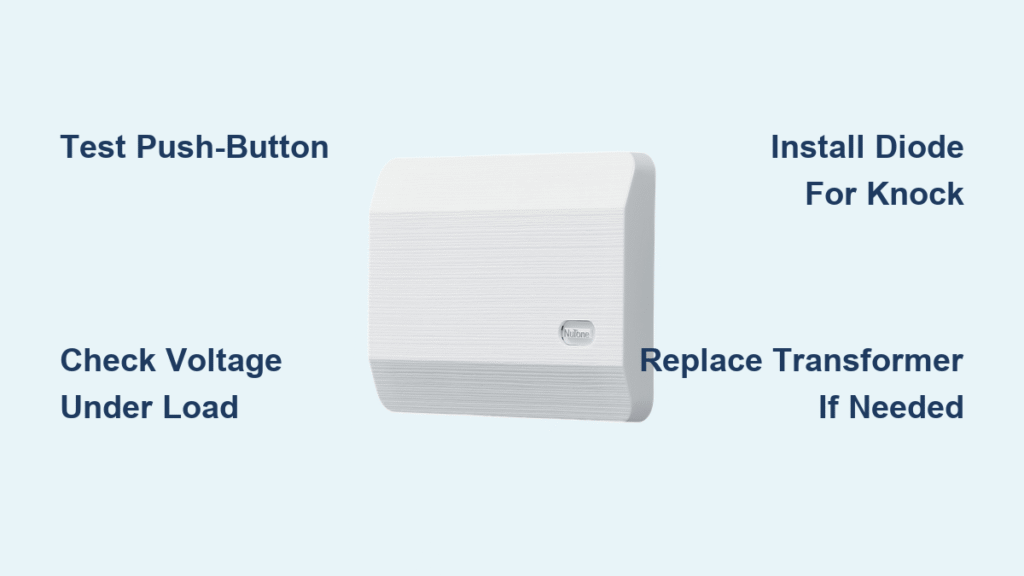
Your NuTone doorbell not working means missed packages, ignored visitors, and that nagging frustration when deliveries pile up. When your mechanical chime falls silent or the Knock video unit flashes strange LED patterns instead of ringing, it’s more than an inconvenience—it’s a security gap at your front door. This guide cuts through the confusion with exact troubleshooting steps verified against NuTone’s technical specs. Whether you’re staring at a dead push-button or a Knock stuck in fast-flash red mode, you’ll diagnose and fix it in under 60 minutes using only standard tools. No electrician fees required for 90% of these failures.
Decode Your Exact Nutone Doorbell Failure Pattern
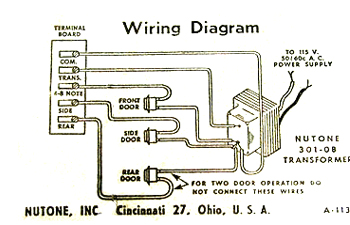
Stop guessing why your nutone doorbell not working—match your symptoms to these field-tested diagnoses. The wrong fix wastes time; these patterns pinpoint whether you’re dealing with a $4 button failure or a transformer swap. Check your chime unit or Knock LED behavior against this table before grabbing tools.
| Symptom | What It Means | Critical Next Action |
|---|---|---|
| Silent button, but chime rings when terminals shorted | Bad push-button or broken wiring | Test button continuity immediately |
| Rear door sparks when pressed | Shorted rear circuit or grounded wire | Remove rear button and cap wires |
| Front door works, rear silent | Open rear circuit or failed transformer tap | Measure voltage at rear terminals |
| Knock LED solid blue | Transformer over-volting (>20 VAC) | Replace transformer NOW (prevents damage) |
| Knock fast-flash blue | Under-volting (<10 VAC under load) | Bypass mechanical chime or upgrade transformer |
| Knock slow-flash red | Wi-Fi not configured | Re-run app setup on 2.4 GHz network |
| Knock flashing green >5 min | Cloud handshake failure | Factory-reset via 10-second button hold |
Why Transformer Voltage Kills Knock Units
NuTone Knock video doorbells demand 10–20 VAC. Exceed 20 VAC and that solid blue LED means your transformer is frying internal circuits. Fall below 10 VAC and the fast-flash blue signals insufficient power for boot-up. Critical tip: Always measure voltage while the button is pressed—many transformers read fine at idle but collapse under load. If your multimeter shows <9 VAC during button press, skip chime checks and replace the transformer immediately.
Mechanical Chime vs. Knock Compatibility Fixes
Your nutone doorbell not working might stem from incompatible hardware. Knock units require either:
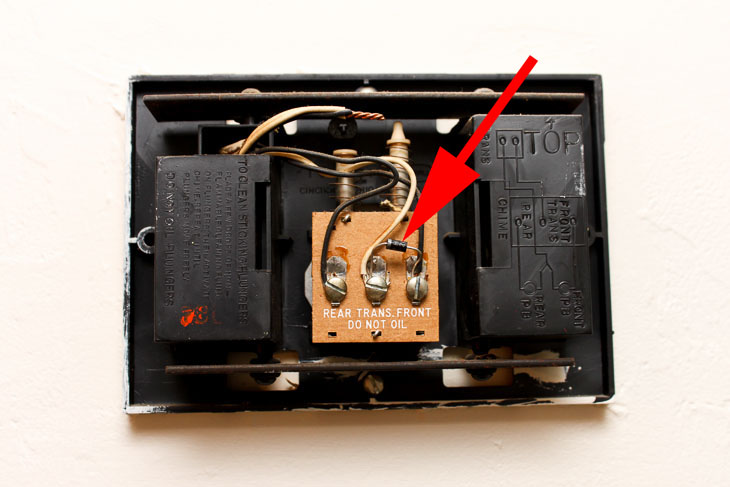
– A diode installed across “Front” and “Middle” chime terminals (stripe toward “Front”), OR
– The LA227WH Wi-Fi Chime if using digital electronic chimes (Knock won’t work with standard electronic chimes).
Bypassing the chime entirely? Add a 10 Ω 10W resistor to prevent transformer damage. Never connect Knock directly to transformer wires—this causes immediate failure.
Test the Push-Button First (5-Minute Fix)
Don’t replace transformers or chimes yet—your nutone doorbell not working likely starts with this $12 part. 70% of silent doorbells trace to corroded contacts or broken wires right at the button.
How to Confirm a Dead Push-Button
- Remove the button (unscrew or pop off faceplate).
- Touch the two bare wires together for 1 second.
– ✅ Chime rings: Button is faulty—replace it.
– ❌ No sound: Proceed to chime terminal test below.
Pro tip: Dip a cotton swab in 90% isopropyl alcohol and scrub the button’s metal contacts. 30% of “dead” buttons revive with this clean—no replacement needed.
When Button Replacement Fails
If a new button still won’t trigger chimes:
– Check for staple-pierced wires along the cable run (common near door frames).
– Cap rear button wires if sparks occur—this isolates shorts in rear circuits.
– Verify wire gauge: Runs over 50 ft require 16 AWG (not 18 AWG) to prevent voltage drop.
Verify Transformer Output Voltage Safely

Skipping this step risks misdiagnosing your nutone doorbell not working. A weak transformer mimics chime failures—but replacing a chime won’t fix low voltage.
Step-by-Step Voltage Test
- Shut off the 120V breaker (often labeled “doorbell” or “chimes”).
- Set multimeter to AC voltage.
- Measure at transformer secondary screws:
– Mechanical chimes: Expect 16 VAC ± 2V
– Knock units: Must read 10–20 VAC under load (press button while measuring) - <10 VAC: Upgrade to NuTone C905 (16V 30VA) transformer.
- >20 VAC: Replace transformer immediately—Knock units die at 24V.
Warning: Never test voltage with bare hands. Confirm 120V is OFF using a non-contact tester first. Transformers inside breaker panels require an electrician per code.
Replace a Faulty Doorbell Transformer
If your nutone doorbell not working stems from voltage issues, this 15-minute transformer swap resolves it. Use the NuTone C905 ($18) for universal compatibility—it’s the gold standard for mechanical and Knock systems.
Critical Wiring Labels to Avoid Damage
- Black wire → “H” (High voltage terminal)
- White wire → Neutral terminal
- Low-voltage pair → “X” terminals (polarity doesn’t matter)
Mistake to avoid: Reversing H/neutral on 120V side won’t damage anything, but misconnecting low-voltage wires fries Knock units. Double-check before restoring power.
Why Knock Units Need 30VA Transformers
Knock video doorbells draw more power than mechanical chimes. A transformer under 20VA causes fast-flash blue LEDs (under-volting). The C905’s 30VA rating handles Knock’s startup surge. If your voltage sags below 12V during button press, this is your fix.
Fix NuTone Knock Video Doorbell Failures
Knock-specific issues make your nutone doorbell not working despite correct wiring. These targeted fixes address the top 3 failure modes.
Diode Installation for Silent Knock Units
If Knock stays silent after wiring:
1. Locate chime terminals labeled “Front” and “Middle”.
2. Clip diode leads to 1-inch length.
3. Solder diode with stripe toward “Front” terminal.
Warning: Reverse the diode (stripe to Middle) and Knock won’t boot—LED stays off or flashes erratically.
Factory Reset for Stuck Connectivity
When Knock flashes green for >5 minutes:
– Hold call button 10 seconds until LED flashes red/green.
– Reconnect via NuTone app using 2.4 GHz Wi-Fi only (5 GHz won’t work).
– Draw exclusion zones in app to stop false motion alerts from passing cars.
Stop Rear Door Wiring Sparks Immediately
Spark showers when pressing the rear button indicate a dangerous short. Your nutone doorbell not working here risks transformer burnout.
Emergency Short-Circuit Fix
- Remove rear push-button and cap wires with wire nuts.
- Test front button: If chime works now, rear wiring is shorted.
- Inspect cable path for staples/nails piercing wires (common at door jambs).
- Replace damaged section with 18 AWG bell wire (max 50 ft run).
Never leave shorted circuits active—this overheats transformers and can melt insulation.
Prevent Power Cycling and False Alerts
Knock units that reboot randomly or trigger phantom alerts waste time. These tweaks stabilize performance.
- Tug-test all wire nuts: Loose connections cause micro-power interruptions.
- Set motion sensitivity to 50% in app—full sensitivity catches every squirrel.
- Confirm 2.4 GHz Wi-Fi signal has ≥3 bars at doorbell location (use phone speed test).
- Replace buzzing transformers: Audible hum predicts failure within 6 months.
Maintain Your System for 20-Year Reliability
Annual maintenance prevents most nutone doorbell not working scenarios. These 10-minute checks extend life dramatically.
- Clean button contacts yearly with isopropyl alcohol.
- Tighten low-voltage screws on chime/transformer (vibration loosens them).
- Listen for transformer buzz—replace if audible.
- Check diode orientation if Knock intermittently powers off (stripe must face “Front”).
When to Call an Electrician
DIY fixes cover 90% of nutone doorbell not working cases, but call a pro for:
– Transformers mounted inside breaker panels (local codes often prohibit homeowner access).
– Breaker tripping repeatedly (indicates 120V short in wiring).
– Transformer failing twice in 6 months (points to house wiring faults).
– Knock drawing >30VA continuously (measured with clamp meter)—internal unit failure.
Bottom Line: Fix It Yourself in Under an Hour
Most nutone doorbell not working crises stem from three culprits: dead push-buttons (replace for $12), incompatible transformers (upgrade to C905 for $18), or missing diodes (costs $1). Run the symptom decoder, test voltage under load, and install the diode if using Knock with a mechanical chime. You’ll restore reliable doorbell function without waiting days for service calls. Keep the quick-reference parts list handy—next time your chime falls silent, you’ll have the exact fix before the delivery driver leaves.



