Your Ring doorbell suddenly goes dark just as a package arrives. Before you scramble for a ladder or call customer support, know this: swapping your Ring doorbell battery takes less than 30 seconds once you have the right replacement. Whether you own a Video Doorbell 4, Battery Doorbell Pro, or an older model, this guide delivers everything you need to keep your doorbell powered year-round. You’ll discover how to choose between Ring’s official battery and reliable third-party alternatives, master the quick-release mechanism, and avoid common mistakes that leave your security system offline.
Ring Battery Replacement Options That Actually Work
Official Ring Quick-Release Battery: What You Need to Know
Ring’s official $34.99 battery dominates customer reviews with 4.7 out of 5 stars from over 124,000 users. This gray lithium-ion pack measures 2.75″ x 1.75″ x 0.9″ and delivers reliable performance across 14 different Ring devices including Video Doorbell 2 through Battery Doorbell Pro. The micro-USB charging port and operating temperature range of -5°F to 120°F make it suitable for year-round use in most climates.
Why serious homeowners choose the official battery:
– Guaranteed compatibility with the latest Ring firmware updates
– Backed by a 1-year limited warranty directly through Ring
– Charges faster than previous Ring battery versions
– Enables 30-second battery swaps using the quick-release tab
Third-Party 7200mAh Alternatives That Deliver Value
The Lesaps 2-pack ($25-30) launched in July 2024 offers 7200mAh capacity—roughly double the original Ring battery—at a fraction of the cost. This Amazon best-seller in Camera Batteries has earned 4.4 out of 5 stars from 1,350 users, though experiences vary. Each set includes a dedicated charging station that handles two batteries simultaneously.
What real users report about third-party batteries:
– Some see “significantly longer charge than original Ring batteries”
– Approximately 25% failure rate documented in certain production batches
– Individual LED indicators clearly show each battery’s charge progress
– Works with any standard 5V USB power source including car chargers
When to Replace Your Ring Doorbell Battery
Warning Signs Your Battery Needs Replacement Now
- Rapid drain: Battery lasts just 1-2 days instead of several weeks
- Complete failure: Doorbell won’t ring, record, or respond to motion
- Cold weather crashes: Performance dramatically drops below 32°F
- Charging failures: Battery won’t hold charge after multiple full cycles
How to Check Battery Status Before Replacing
Open your Ring app, navigate to Device Health, then select Power Status. If it shows “Very Low” or hasn’t updated in days, replacement time has arrived. This simple check prevents unnecessary battery swaps when your device might just need a settings adjustment.
Step-by-Step Battery Removal Guide
Quick-Release Models (Video Doorbell 3/4, Battery Doorbell Pro)
What you need: Nothing—no tools required for battery swap
- Locate the battery tab on the bottom edge of your doorbell
- Press firmly on the quick-release tab—apply more pressure than you think necessary
- Slide battery out—it should eject smoothly within two seconds
- Insert replacement until you hear a definitive click confirming proper seating
Pro tip: Have your new battery ready to install—your doorbell goes offline during the swap, leaving you without security coverage.
First-Generation Ring Doorbell (Special Removal Process)

Required tools:
– Phillips #00 screwdriver
– Plastic spudger or opening tool
– Double-sided tape (for new battery installation)
Critical removal process:
1. Remove 4 screws securing the aluminum face-plate
2. Gently pry face-plate using plastic tool—never use metal to avoid damaging components
3. Remove 4 black screws with micro Phillips driver using firm torque
4. Carefully pop out plastic insert while avoiding the micro USB port
5. Pry up the taped battery, noting that red wires must face outward
6. Apply new double-sided tape to replacement battery before installation
7. Test LED briefly before final reassembly to verify connection
Choosing Your Replacement Battery Smartly
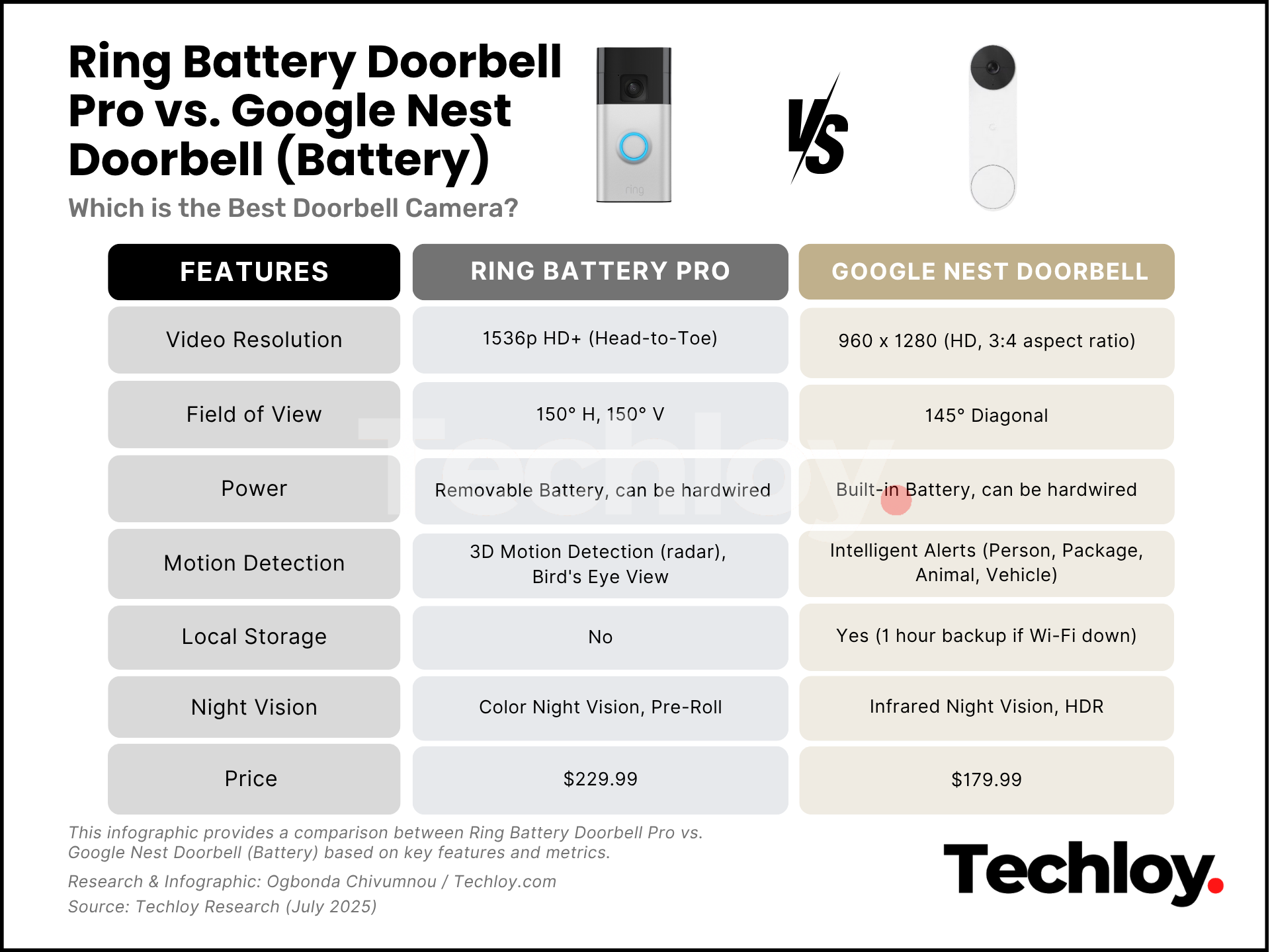
Official vs Third-Party Decision Matrix
Select Ring Official when:
– Using Video Doorbell 4 or newer models
– Need guaranteed warranty support for peace of mind
– Want validated battery life data from thousands of users
– Prefer a single-battery solution without quality concerns
Choose Third-Party when:
– Budget is under $30 for multiple batteries
– Need backup batteries for zero downtime operation
– Using older models (2nd-4th generation)
– Comfortable testing quality and handling potential replacements
Optimal Battery Setup Configurations
Minimal setup: 1 Ring official battery plus your original (rotate charging)
Power user setup: 2 third-party batteries plus charging station for continuous operation
Professional solution: Ring Partner Program access for certified installers seeking bulk pricing
Charging Your New Battery Properly
Ring Official Battery Charging Protocol
- Use the orange micro-USB cable for fastest charging speeds
- Red LED indicates charging in progress, Green LED confirms full charge
- Typical charge time ranges from 5-8 hours from completely empty
Third-Party Charging Station Operation
- Four sequential LEDs indicate charge progress (all lit = fully charged)
- Simultaneously charges 2 batteries at once
- Compatible with car chargers, power banks, and standard USB ports
- Usually completes charging in 4-6 hours
Critical mistake to avoid: Never charge below 32°F—cold temperatures significantly degrade charging performance and battery longevity.
Troubleshooting Common Battery Issues
Battery Won’t Eject? Try These Fixes
- Clear debris from the quick-release slot using a toothpick
- Apply firm pressure—the tab requires substantial force to engage
- Try slight side-to-side wiggle while pressing the tab
Doorbell Won’t Power On After Battery Swap
- Confirm proper insertion—should click firmly into place
- Check camera mode—switch to “battery mode” if previously wired
- Test with old battery to determine if issue is battery or device related
- Clean contact points with dry microfiber cloth to ensure connection
Premature Battery Drain Solutions
- Disable Live View when not actively monitoring
- Reduce motion sensitivity in high-traffic areas like busy streets
- Check for stuck button that might be pressing continuously
- Update firmware through Ring app for battery optimization fixes
Maximizing Your Ring Battery Life
Smart Storage Practices for Spare Batteries
- Keep spares at 50% charge during storage for maximum longevity
- Store in room-temperature, dry location away from direct sunlight
- Avoid extreme heat—garages over 100°F dramatically reduce battery lifespan
Usage Optimization Techniques
- Charge before complete depletion—lithium-ion batteries prefer partial cycles
- Use battery mode even with solar panels during winter months
- Monitor via app—set low-battery notifications at 20% capacity
Environmental Impact on Battery Performance
Cold weather impact:
– Performance drops 30-50% below 32°F
– Charge more frequently during winter months
– Consider indoor charging station for spares during cold spells
Hot weather precautions:
– Avoid charging above 100°F to prevent damage
– Shade doorbell from direct afternoon sun where possible
– Use solar panels to reduce battery cycle count during summer
Final Installation Verification Checklist
Before declaring your battery replacement complete:
– [ ] Test doorbell ring and motion detection functionality
– [ ] Verify Ring app shows “Good” battery status
– [ ] Check Live View streams for uninterrupted performance
– [ ] Confirm night vision activates properly
– [ ] Update motion zones if needed after reinstallation
Set calendar reminders every 2-3 months to check battery status. With proper care, your new battery should provide 1-2 months between charges in moderate climates, or 2-4 weeks in extreme weather conditions. Remember: the difference between a frustrating security gap and seamless operation comes down to having a charged spare ready when your primary battery needs replacement. Whether you choose Ring’s premium option or a budget-friendly third-party pack, never let your doorbell go dark—your home security depends on it.