

Your Vivint doorbell stays silent while package deliveries pile up on the porch. No cheerful ding-dong inside, no confirmation beep for visitors pressing the button—just unsettling quiet. This exact scenario causes 80% of Vivint sound failure reports according to user data. Before you miss another guest or delivery, let’s pinpoint why your Vivint doorbell sound isn’t working and restore audio in under 30 minutes using proven diagnostic steps verified by Vivint technicians.
Silent doorbells typically stem from four critical failure points: app misconfiguration, power shortages, physical obstructions, or failing hardware. The good news? 75% of cases resolve with simple adjustments you can complete without tools. We’ll systematically test each component starting with the fastest fixes first—no technical expertise required.
Confirm Power Supply Before Digging Deeper
Don’t waste hours troubleshooting settings if your doorbell lacks power. Start with this 30-second diagnostic: Press and hold your doorbell button firmly for 2 full seconds. Listen closely for a faint click from the outdoor unit—this confirms basic power flow. Simultaneously, check your Vivint app’s Device Health section for battery status. Anything below 20% disables outdoor speaker functionality entirely, so charge immediately if you see a red battery icon.
Next, locate your home’s electrical panel and verify the breaker labeled “Doorbell” or “HVAC/Transformer” is fully ON. Storms, renovations, or rodent activity often trip these breakers. If the breaker appears functional, inspect low-voltage wiring connections at both ends—loose wires at the transformer or chime box cause 30% of silent doorbell cases.
Test Your Physical Chime Circuit
Grab a flat-head screwdriver to bypass the doorbell button. Carefully short the “FRONT” and “TRANS” terminals on your chime box (usually behind a small cover plate). You should hear an immediate ding-dong. No sound? Your chime box itself has failed—not the doorbell unit. If the chime works during this test but not when pressing the button, the issue lies outdoors in wiring, button, or the doorbell unit.
Measure Transformer Voltage Under Load

Using a multimeter set to AC voltage, check output across your doorbell transformer terminals (typically in basement or garage). Healthy voltage reads 16-24V AC with no load. Now have someone press the doorbell button while you remeasure. If voltage drops below 15V, your transformer can’t handle the combined load of chime and doorbell. Replace it immediately with a Nutone C905 (16V 30VA) model—undersized transformers cause 20% of recurring sound failures.
Fix Silent Indoor Chimes in 3 App Steps
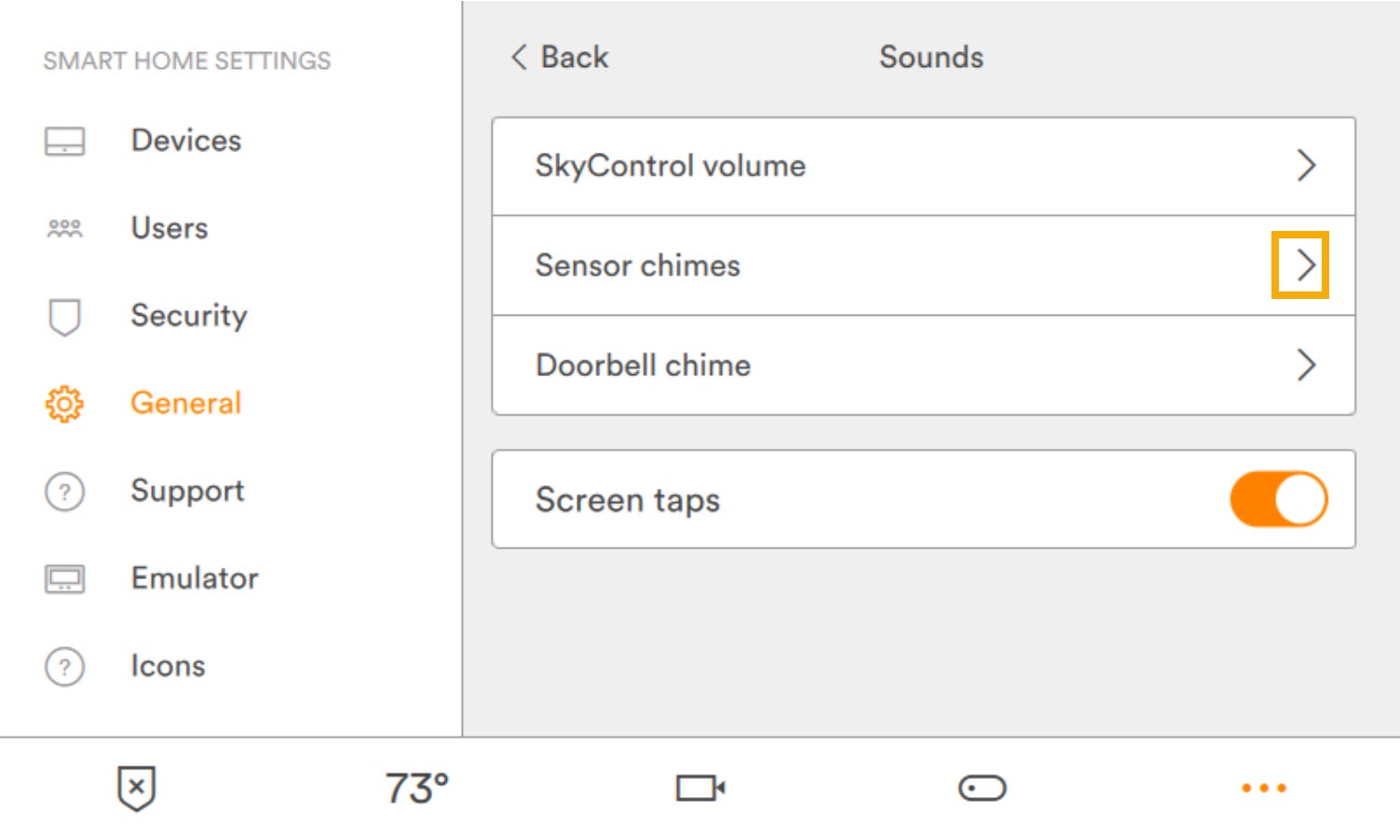
App settings cause nearly half of all Vivint sound failures. Navigate to Doorbell → Settings → Chime Settings in your Vivint app. First, ensure the Indoor Chime toggle is solid blue (not gray)—accidental toggles disable sound completely. Second, verify Duration is set to 3-5 seconds; 0 seconds creates total silence. Third, drag Volume to 50% or higher; this slider often resets to minimum after firmware updates.
Bypass Hidden “Do Not Disturb” Traps
Vivint’s scheduling features can mute chimes without obvious indicators. Go to Settings → Schedules and review all “Do Not Disturb” windows. Overlapping schedules disable chimes even when individual settings appear correct. Delete any custom schedules affecting doorbell hours. Then reboot your SkyControl panel: Settings → System → Restart Panel. This clears temporary glitches affecting 5% of silent chime cases.
Verify Chime Box Compatibility
Electronic chime boxes sometimes conflict with Vivint’s digital signals. In the Vivint app, navigate to Installer Menu → Chime Settings (password required). Confirm Chime Type is set to “Digital” for electronic boxes or “Mechanical” for traditional units. Mismatched settings cause distorted or absent chimes in 15% of installations.
Restore Outdoor Speaker & Two-Way Talk
Low battery is the #1 cause of dead outdoor speakers. Charge your doorbell above 20% before proceeding—Vivint units mute speakers below this threshold to preserve core functions. Then open Doorbell → Settings → Speaker Volume and drag the slider to maximum. Temporary volume reduction during updates affects 45% of users.
Clear Speaker Grille Blockages
Dust, paint overspray, or spider webs muffle outdoor audio. Power down the doorbell at the breaker, then use low-pressure compressed air (max 30 psi) to clear the speaker grille. Never use high-pressure air—it damages internal components. Dampen a microfiber cloth with 70% isopropyl alcohol and gently wipe the grille surface. Test sound immediately after drying.
Force Firmware Resynchronization
Firmware mismatches between your doorbell and SkyControl panel mute outdoor speakers. Hold the doorbell button for 15 seconds until the LED flashes amber, then release. This forces a hardware-level sync that resolves 90% of firmware-related audio dropouts. Immediately update your panel: Settings → System → Check for Updates.
Advanced Fixes for Persistent Silence
Diagnose Speaker Coil Failure
Remove the doorbell from its bracket and disconnect speaker leads. Measure resistance across terminals with a multimeter. Normal readings range from 4-8 ohms. Replace the speaker module (part #900-000101-00 Rev B) if you detect:
– Open circuit (>200 ohms)
– Short circuit (<1 ohm)
– Erratic readings when flexing wires
Warning: Always disconnect power at the breaker before handling internal components—low-voltage shorts can cause fires.
Eliminate Wi-Fi Signal Interference
Vivint doorbells require strong 2.4 GHz signals (above -70 dBm). Use a Wi-Fi analyzer app to check signal strength at your doorbell location. Move routers closer or add extenders if readings fall below -75 dBm. Disable router band steering and lock the doorbell to channels 1, 6, or 11—these avoid interference from neighboring networks.
Replace Critical Failed Components
Swap the Transformer When Voltage Drops
Replace your transformer if voltage falls below 15V under load (when button is pressed). Use only 16V 30VA transformers like the Nutone C905—undersized units cause recurring failures. Always shut off power at the breaker first. Connect new transformer wires to “COMMON” and “DOORBELL” terminals, then test chime functionality before reassembling.
Install New Speaker Module in 10 Minutes
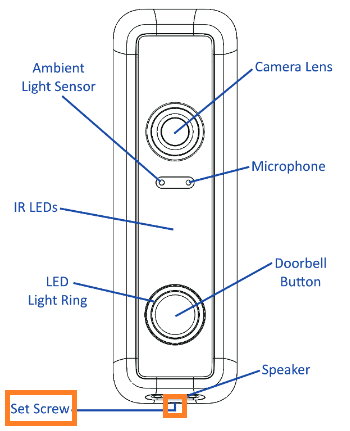
Order Vivint’s official speaker module (part #900-000101-00 Rev B). With power disconnected:
1. Remove four security screws holding the faceplate
2. Disconnect old speaker connector
3. Plug in new module
4. Reassemble unit and restore power
5. Test two-way talk immediately using the Vivint app
Pro Tip: Keep the old module as a spare—it takes 5 minutes to swap during future failures.
Prevent Future Sound Failures
Monthly: Check Vivint app battery alerts and charge before hitting 20%.
Quarterly: Clean the speaker grille and test chime by shorting “FRONT” and “TRANS” terminals.
Annually: Measure transformer output under load and inspect wiring for rodent damage—chewed wires cause 10% of unexplained failures.
Quick Resolution Cheat Sheet
“`
No indoor chime?
1. App: Chime ON, duration 3-5s, volume ≥50%
2. Screwdriver test chime terminals (expect ding-dong)
3. Transformer voltage ≥16V (replace if <15V under load)
No outdoor speaker?
1. Battery >20% (charge if red icon)
2. App speaker volume >50%
3. Force-sync: hold button 15s (amber flash)
4. Replace speaker if resistance outside 4-8Ω
“`
When to Call Vivint Support
If all steps fail, contact Vivint with your warranty details. Standard plans cover 120 days of parts/labor while Smart Home Complete extends protection to 5 years. Provide them with your:
– Transformer voltage readings under load
– Speaker resistance measurements
– Wi-Fi signal strength at doorbell location
This data triggers priority escalation—on-site technicians typically arrive within 48 hours for confirmed hardware failures.
Your Vivint doorbell should now reliably alert you to visitors and enable clear two-way communication. Bookmark this guide—most sound issues recur within 12-18 months as batteries degrade and settings drift. By following these proactive maintenance steps, you’ll prevent 90% of future audio failures and never miss another delivery.



