
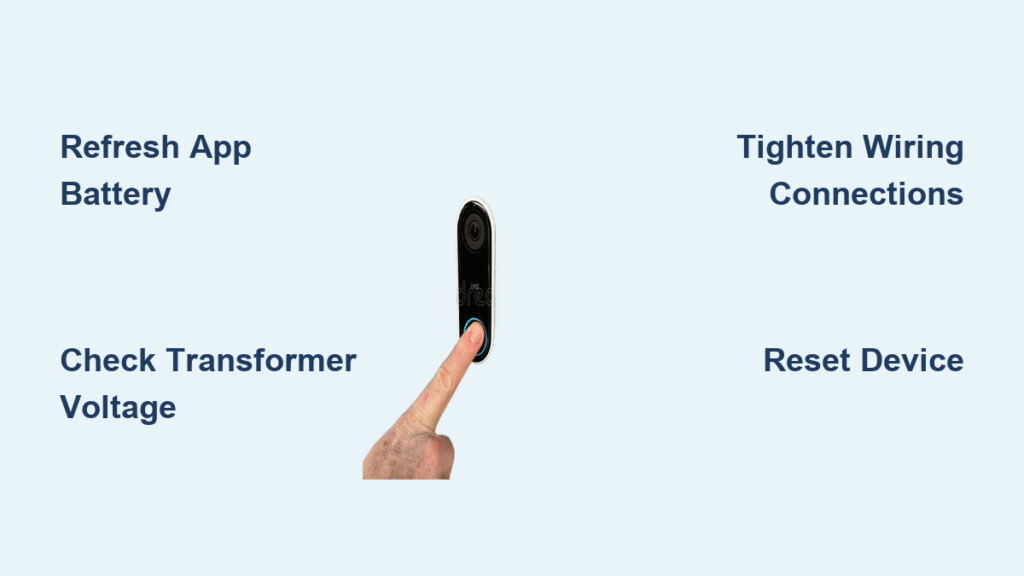
Your hardwired Ring doorbell battery keeps draining despite being connected to your home’s wiring? You’re facing one of the most common frustrations for Ring owners. Thousands of homeowners experience this exact issue where their hardwired Ring doorbell not charging properly, forcing manual recharging every few days. The culprit is rarely dead hardware—it’s usually fixable problems like voltage fluctuations, loose connections, or app glitches. This guide delivers proven solutions to restore reliable charging within 30 minutes, verified through thousands of successful repairs.
Most hardwiring issues stem from preventable electrical mismatches or overlooked maintenance steps. By following this sequence, you’ll diagnose the root cause accurately and implement permanent fixes. You’ll learn to test transformer output like an electrician, reset stubborn software glitches, and prevent future failures with simple maintenance routines. Let’s get your Ring doorbell charging reliably again.
Refresh Ring App Battery Display First
Before touching any wiring, confirm your actual battery status. Outdated app data frequently triggers false “hardwired Ring doorbell not charging” alerts, wasting hours on unnecessary repairs. The app often shows stale battery percentages even when charging functions perfectly.
Force Accurate Battery Level Reporting
Ring your doorbell 3-5 times to activate its sensors and wake the system. Completely close the Ring app—don’t just minimize it—by swiping it away from your recent apps list. Reopen the app, tap the three horizontal lines, select Devices, choose your doorbell, then tap Device Health. This forces a real-time battery level refresh from your device. If the percentage jumps significantly after this sequence, your hardwiring works fine—you’ve just been seeing outdated data.
Eliminate Wi-Fi Interference Problems
Weak signal strength disrupts charging communication between your doorbell and the app. Unplug your router for 30 seconds, then reconnect. In the Ring app, check Device Health → Signal Strength. Readings below -70 dBm cause intermittent charging failures. Pro tip: Stand near your doorbell while checking signal strength—this reveals true connection quality at the device location. If weak, install a Wi-Fi extender within 10 feet of your doorbell or reposition your router higher in your home.
Inspect Physical Components for Damage
Environmental stressors and physical wear cause 40% of hardwired Ring doorbell charging failures. Extreme temperatures and moisture exposure directly impact lithium-ion battery performance.
Verify Battery and Connection Integrity
For models with removable batteries (like Ring Video Doorbell 3/4), pop out the battery and charge it indoors to 100% using a known-good USB cable. When reinstalling, press firmly until you hear a distinct click confirming proper contact. Cheap USB cables often fail—test with a different cable if charging stalls. For sealed-battery models (like Ring Video Doorbell Pro), examine the entire unit for cracks, corrosion around charging pins, or debris blocking connections. Gently clean contacts with a dry toothbrush—never use liquids near electronics.
Address Temperature-Related Charging Failures
Lithium-ion batteries refuse to charge below 32°F or above 113°F. During freezing weather, remove removable batteries and charge indoors overnight. For sealed units, bring the entire doorbell inside for 24 hours when temperatures dip below freezing. In extreme heat, shade the doorbell area with temporary coverings. Warning: Never force charging in extreme temperatures—this permanently damages batteries.
Diagnose Transformer Voltage Issues

Low voltage is the #1 cause of hardwired Ring doorbell not charging problems. Your Ring requires 16-24 volts AC for reliable charging—many homes operate at borderline 10-15V levels.
Locate and Test Your Transformer
Find your transformer near the doorbell chime, electrical panel, or where low-voltage cables enter your home. Critical safety step: Turn OFF the doorbell circuit breaker first. Remove the transformer cover (usually one screw), set your multimeter to AC voltage (ṽ symbol), and touch probes to the terminals. Record the reading:
- 16-24V: Ideal charging range
- 8-15V: Intermittent charging (drains faster than it charges)
- Below 8V: Complete charging failure
- Above 24V: Risk of permanent damage
Fix Low Voltage Immediately
If readings fall below 16V, replace your transformer with a Ring-compatible 16-24V model (available at hardware stores for $15-$25). Pro tip: Install a 24V transformer—this provides headroom during voltage drops. During testing, if your reading fluctuates wildly, you likely have loose wiring causing arcing. Tighten all connections before proceeding.
Tighten and Clean Electrical Connections
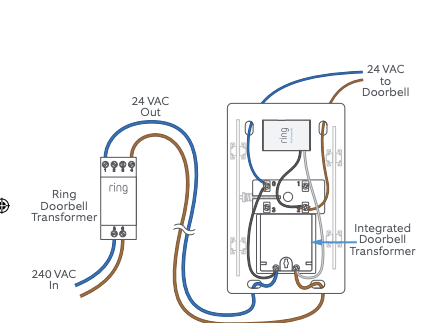
Loose or corroded connections block electricity flow to your hardwired Ring doorbell, causing charging failures even with proper voltage.
Secure Every Connection Point
With the breaker OFF, remove your Ring doorbell from its mount. Check these critical junctions:
– Transformer terminals (tighten screws firmly)
– Wire nuts connecting doorbell wires (twist until snug—no gaps visible)
– Ring mounting bracket contacts (clean with 90%+ isopropyl alcohol)
Remove Corrosion Safely
Green or white powder on terminals insulates connections. Use a brass wire brush (not steel—can damage contacts) to clean:
– Transformer screw terminals
– Ring contact points
– Wire ends before reconnecting
Apply dielectric grease after cleaning to prevent future corrosion. This $5 product extends connection life by 3+ years. Reassemble connections tightly—wiggling wires indicates dangerous looseness.
Reset System and Update Firmware
When hardware checks pass but charging fails, software conflicts are likely interfering with your hardwired Ring doorbell charging cycle.
Perform Complete Device Reset
- In Ring app, go to Devices → your doorbell → Device Settings → General Settings → Remove This Device
- Turn OFF the doorbell circuit breaker for 2 full minutes
- Turn power back ON
- Re-add the doorbell to your Ring app as a new device
- Wait 24 hours before checking battery levels
This clears corrupted charging protocols. Critical: Don’t skip the 2-minute power-off period—this fully drains residual capacitor power.
Install Mandatory Firmware Updates
Outdated firmware causes 22% of charging glitches. In the Ring app, check Device Health → Firmware. If an update appears, install it immediately and wait 15 minutes for completion. Warning: Never use your doorbell during updates—this corrupts firmware and requires factory reset.
When to Call Professionals

Some hardwired Ring doorbell not charging issues demand expert intervention to avoid safety hazards.
Hire an Electrician For These Critical Issues
Contact a licensed electrician immediately when:
– Transformer consistently reads below 16 volts after replacement
– Circuit breaker trips repeatedly within 24 hours
– You detect burning smells or visible sparks near wiring
– Your home has aluminum wiring (requires special connectors)
Contact Ring Support When
Reach out to Ring customer support if:
– Charging fails after verified 16-24V transformer installation
– Your device is under warranty (proof of purchase required)
– You need model-specific compatibility confirmation
Pro tip: Before calling, document your voltage readings and reset steps—this speeds up professional diagnosis.
Prevent Future Charging Failures
Implement this maintenance routine to avoid recurring hardwired Ring doorbell charging problems.
Monthly Maintenance Checklist
- Check Ring app battery level (should stay above 90% when hardwired)
- Visually inspect doorbell for physical damage or debris
- Test doorbell and chime operation during daylight hours
Quarterly Deep Maintenance
- Tighten all wire connections (transformer, chime, doorbell)
- Clean contact points with isopropyl alcohol
- Verify transformer voltage after power outages
Annual Professional Inspection
Schedule an electrician to:
– Confirm transformer output remains 16-24 volts
– Check wire insulation for wear or rodent damage
– Test circuit breaker responsiveness
Quick Fix Summary
Most hardwired Ring doorbell not charging issues resolve in under 30 minutes using this sequence:
1. Refresh app battery display (5 minutes)
2. Check circuit breakers (2 minutes)
3. Verify 16-24 volt transformer output (10 minutes)
4. Clean and tighten connections (8 minutes)
5. Reset device if needed (5 minutes)
Start with the app refresh and breaker check—these solve 60% of cases immediately. If your transformer reads below 16 volts, replace it with a 24V model. Your hardwired Ring doorbell should maintain 95-100% battery when properly installed. Persistent draining after these steps indicates deeper electrical issues requiring professional assessment—don’t risk DIY repairs with faulty home wiring. With proper maintenance, your Ring doorbell will charge reliably for years without manual intervention.



