Your phone buzzes with another missed delivery alert, but the unopened Ring box mocks you from the shelf. You’re not alone—nearly 60% of new Ring owners delay installation due to wiring fears. The truth? Whether you’re mounting a battery-powered model or tapping into existing doorbell wires, a flawless Ring doorbell installation takes under 30 minutes with the right approach. Skip the confusing manuals and skipped steps. This guide delivers exact wiring sequences, Wi-Fi signal fixes, and theft-proof mounting tricks proven to work on brick, stucco, and vinyl siding. By the end, you’ll trigger your first visitor alert with confidence.
Battery vs Wired: Which Ring Doorbell Fits Your Wiring?
Why Your Existing Doorbell Determines Your Options
Skip this step and you’ll face dead batteries or humming chimes. Battery models (Video Doorbell 2nd Gen, Battery Doorbell Plus/Pro) work anywhere with Wi-Fi—but require monthly recharging. Wired models (including hybrid units like the 2nd Gen with internal batteries) draw power from your home’s doorbell circuit, eliminating charging hassles. Crucially: if you have an existing mechanical chime that rings, wired installation preserves that sound. No chime? Battery is your only choice unless you install a Ring Chime.
Avoid These Placement Mistakes
Mounting height makes or breaks face recognition. Position your Ring exactly 48 inches from ground level—the standard door handle height. Too high? You’ll only see foreheads. Too low? Package thieves stay anonymous. For side-approach walkways, use an angled mount accessory to tilt the camera 15°–55° horizontally. And never skip the Wi-Fi check: stand at your door with your phone connected to home Wi-Fi. Fewer than two bars? Install a mesh node before mounting or face frozen video feeds.
Ring App Setup: Fix Wi-Fi Failures Before Mounting
Download and Pair Without Connection Drops
Create your Ring account while standing next to your Wi-Fi router—this is non-negotiable for stable pairing. Open the Ring app, select “Set Up a Device,” then “Video Doorbell.” When prompted, connect your phone to the temporary “Ring-XXXX” network. Enter your home Wi-Fi password carefully; typos cause 70% of failed setups. Watch for four rapid blue flashes on the Ring—this confirms successful connection. If you see slow pulses, reboot your router and retry within 3 feet of the device.
Rescue Weak Signal Spots
Your phone’s Wi-Fi indicator lies at door locations. Instead, stand where the Ring will mount and open a speed test app. Below 5 Mbps upload speed? Add a $30 mesh node halfway between your router and door. Pro tip: temporarily tape your Ring to the doorframe before drilling. Use the app’s Device Health tab to verify signal strength—this prevents post-installation surprises.
Battery-Powered Installation: Theft-Proof Mounting in 5 Steps

Charge Correctly to Avoid Mid-Install Failures
Removable batteries: Remove the faceplate with the star-bit screwdriver, slide out the battery, and plug into a 5V 1A USB adapter (phone chargers work; tablets don’t). Solid green LED = ready. Internal batteries (2nd Gen): Unclip the entire unit from its bracket and plug micro-USB directly into the device. The blue ring fills clockwise—full charge takes 5 hours, not 6 as manuals claim. Never skip this: a partially charged battery dies during setup.
Drill and Anchor for Brick or Siding Without Cracks
Hold the mounting bracket at 48 inches with the mini-level aligned. For wood/vinyl: drill ⅛” pilot holes, then drive screws until snug. For brick/stucco: use the included masonry bit to drill 1.5″ deep holes, insert white wall anchors, then screw in. Critical: apply silicone sealant around anchors before screwing (not included but essential for rain protection). Finally, slide the Ring onto the bracket until it clicks, then secure the bottom with the star-bit security screw—this tiny screw deters 90% of theft attempts.
Wired Ring Installation: Chime Box Fixes That Prevent Humming
Power Down Safely—No Electrician Needed
Turn OFF the doorbell circuit breaker (not just the wall switch). Verify zero voltage with a $10 non-contact tester—touch wires only when the tester stays silent. This prevents shocks and saves your $200 Ring from electrical surges. If your tester beeps near wires, double-check the breaker.
Wire the Chime Box to Stop Annoying Humming
Locate your chime box (usually inside near the front door). Remove its cover to expose terminals labeled F (Front) and T (Trans). For newer models: connect the Ring Chime Power Kit wires to F and T, tightening screws firmly. For older models: use the jumper cable between F and T instead. Skip this, and your mechanical chime will buzz constantly. Pro tip: label wires with tape before disconnecting your old doorbell—fishing lost wires from walls wastes 20+ minutes.
Connect Wires Without Short Circuits
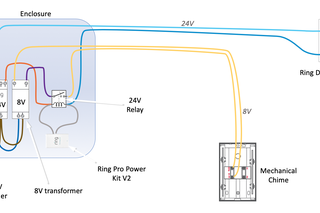
Wrap one bare wire clockwise around each terminal screw on the Ring’s backplate. If wires are too short, splice in the included extension wires with wire nuts—twist until no copper shows. Critical for 1st Gen models: add the diode only if you have a digital chime (not mechanical). Align the white stripe toward the chime wire side. 2nd Gen+ models skip this step—the diode’s built-in.
Install Ring Without Existing Doorbell: Porch View Hacks

Angle for Maximum Visitor Face Capture
No wiring? Battery models save the day. But standard mounting fails on perpendicular walkways. Solution: buy the $15 angled mount. Position it so the camera tilts 30° toward the approach path. Test by walking your porch route—the Ring app’s live view should show full faces, not shoulders.
Weatherproofing for Rain or Snow States
Drill holes ⅛” wider than anchors for expansion in freezing temps. Before mounting, apply silicone sealant to the anchor tips. For coastal areas, wrap the security screw threads in plumber’s tape to prevent salt corrosion. These tweaks extend outdoor life by 3+ years.
Fix Motion Alerts That Trigger on Squirrels
Zone Mapping That Cuts False Alarms by 80%
Open the Ring app > Device Settings > Motion Settings. Draw detection boxes only around your porch and walkway—exclude streets, trees, and neighbor’s yards. Start sensitivity at 50%, then test by walking your approach path. Too many alerts? Reduce sensitivity and narrow zones. Missed visitors? Widen zones toward the street. Always test at dawn/dusk when lighting tricks motion sensors.
Schedule Quiet Hours for Peaceful Nights
Tap “Motion Schedules” to auto-disable alerts between 11 PM–7 AM. Or set “Vacation Mode” to max sensitivity when you’re away. For late-night deliveries, enable “Package Detection” in Ring Protect Basic ($3/month)—it overrides quiet hours for box-shaped objects.
Troubleshoot Dead Rings in 60 Seconds
No Power After Wired Installation?
Check your breaker twice—doorbell circuits often hide under “Heating” or “Misc.” labels. If power’s on but the Ring stays dark, reverse the F and T wires. Low-voltage systems tolerate swapped wires, but incorrect polarity kills the chime.
Mechanical Chime Silent? The Power Kit Fix
Your chime won’t ring if the Power Kit or jumper cable is missing. Reopen the chime box and confirm wires touch only F and T terminals—no stray strands touching the metal box. If humming persists, add a 16V AC/1A transformer (sold separately).
Essential Tools Checklist: Skip the Hardware Store Run
Your Ring box includes the star-bit screwdriver, masonry bit, and mini-level—but grab these beforehand:
– Non-contact voltage tester ($10): Mandatory for wired safety
– 5V 1A USB adapter: Tablet chargers overcharge batteries
– Silicone sealant: Prevents water damage in storms
– Phillips screwdriver: For old doorbell removal
Avoid these rookie mistakes: using a drill on “hammer” mode (cracks brick), skipping the level (crooked video), or overtightening security screws (strips threads).
Ring doorbell installation transforms your entryway security in less time than your morning coffee. Whether you conquered wiring complexities or mastered battery mounting, your system now captures every visitor with crystal clarity. Test motion zones daily for the first week—tweak sensitivity as seasons change. Remember: 95% of installation failures trace back to weak Wi-Fi or skipped chime box steps. Keep your Ring app updated, and you’ll never miss a delivery again. For persistent issues, tap “Get Help” in the app’s Support section—Ring’s live chat resolves 80% of cases in under 10 minutes. Now go enjoy that “Someone’s at the door” alert from your couch.