
Your doorbell camera shows a visitor, but your chime stays silent. That frustrating disconnect between seeing someone at your door and hearing no alert defeats the entire purpose of your security system. Whether you’re missing packages, ignoring delivery drivers, or worrying about elderly visitors unable to get your attention, a chime doorbell not ringing creates daily security gaps. The good news? Over 90% of these failures stem from fixable issues you can resolve in under 30 minutes with basic tools.
Most silent chime problems trace back to four root causes: loose wiring connections, dead power sources, wireless range limitations, or simple device malfunctions. You don’t need an electrician or expensive repairs for most cases. This guide cuts through confusing forums to give you a step-by-step diagnostic path proven to restore that critical “ding-dong” sound. By the end, you’ll confidently troubleshoot any wired or wireless chime system—whether it’s a basic model or smart device like Ring.
Why Wiring Failures Make Your Chime Doorbell Not Ring

Start your chime doorbell not ringing diagnosis at the physical connection points. Over time, vibrations from door slams and temperature shifts work wires loose inside the chime box. This breaks the electrical circuit needed to activate your chime. Ignoring these connections wastes hours checking unnecessary components.
Spot Critical Wiring Red Flags
Remove your chime cover and inspect every terminal connection. Gently tug each wire—if it pulls free, that’s your culprit. Watch for these silent killers:
– Wires held by single copper strands (replace immediately—fire hazard)
– Green or white corrosion on terminals (acts as an insulator blocking current)
– Burnt black wire ends (indicates power surges damaging connections)
– Missing wire nuts on spliced connections (exposes bare copper)
Pro tip: Place masking tape labels on wires before disconnecting. Photograph terminal positions—this prevents miswiring during reconnection.
Clean Corroded Terminals in 3 Minutes
Corrosion causes nearly 40% of wired chime failures according to doorbell repair data. Never skip this step when troubleshooting a chime doorbell not ringing:
1. Turn OFF power at your breaker (non-negotiable safety step)
2. Scrape terminals with 220-grit sandpaper until shiny metal appears
3. Wipe away residue with isopropyl alcohol and cotton swab
4. Apply dielectric grease to prevent moisture buildup
Time estimate: 5 minutes. Difficulty: Beginner.
Power Supply Fixes for Silent Doorbell Chimes
Dead power sources cause more chime failures than any other single issue. Wired systems fail when transformers die; wireless units quit when batteries deplete. Checking power takes under 2 minutes but solves half of all chime doorbell not ringing cases.
Replace Batteries Like a Pro
Battery-powered chimes (like Ring Chime Mini) fail silently when power drops below 1.2V. Don’t just swap one battery—this causes voltage imbalances:
– Always replace all batteries simultaneously—even if some test “good”
– Use name-brand lithium batteries (cheap alkalines leak in 6-8 months)
– Clean contacts with rubbing alcohol before inserting new batteries
Warning: Swollen or leaking batteries require immediate disposal—do not reuse compartment until fully cleaned.
Test Wired System Voltage Correctly
Wired chimes need 16-24V AC to function. Use a multimeter to diagnose:
1. Set meter to AC voltage (200V range)
2. Touch probes to transformer terminals (typically labeled “FRONT” and “TRANS”)
3. Reading below 16V? Replace transformer ($12-$25 at hardware stores)
4. Zero reading? Check circuit breaker—doorbells often share circuits with lighting
Expert note: Transformers fail after 7-10 years. If yours is original to your home, replace it preventatively.
Solve Wireless Range Issues Causing Chime Doorbell Not Ringing
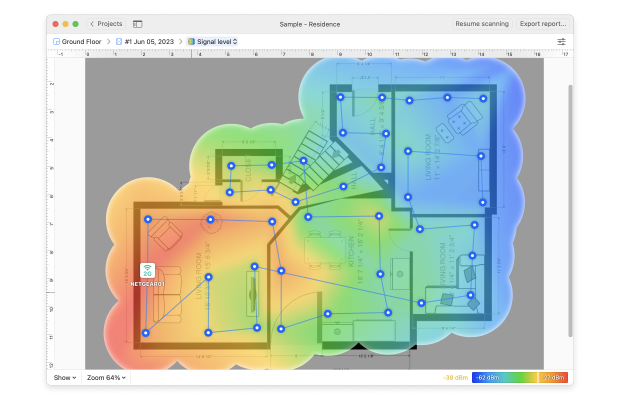
Wi-Fi and Bluetooth chimes fail when signal strength drops below -70dBm. This “dead zone” problem causes intermittent silence where your chime doorbell not ringing only occurs at certain times of day.
Diagnose Range Problems in 60 Seconds
Move your wireless chime within 3 feet of your doorbell. Press the button—did it ring? If yes, you’ve confirmed a range issue. Now optimize:
– Reposition chime away from metal appliances (fridges, microwaves)
– Mount 3-4 feet high on interior walls (avoid floor-level placement)
– Add Wi-Fi extenders if walls exceed 100 feet thick (use free apps like Wi-Fi Analyzer to map dead zones)
Time-saver: Test signal strength before permanent mounting using temporary tape.
Reset Wi-Fi Connections Without Factory Reset
Most Ring chime not ringing issues stem from router password changes. Fix without losing settings:
1. Open Ring app → Select Chime → Device Health
2. Tap “Wi-Fi Connectivity” → “Reconnect”
3. Enter current Wi-Fi password (critical—many fail here)
4. Hold chime reset button 5 seconds until blue light flashes
Red flag: If app shows “Offline,” restart your router first—90% reconnect after reboot.
Advanced Tests to Diagnose Chime Doorbell Not Ringing
When basic fixes fail, these pro-level tests pinpoint whether your chime, doorbell, or wiring has failed. You’ll need only a $5 jumper wire from any hardware store.
Perform the Bypass Test (Critical Safety Step)
This isolates whether your doorbell button or chime unit has failed:
1. TURN OFF BREAKER POWER (safety first—doorbells use 16-24V but mistakes cause shocks)
2. Remove doorbell button cover
3. Briefly touch the two wires together with insulated pliers
4. Chime rings? → Faulty doorbell button (replace for $15)
5. Silent? → Proceed to chime unit test
Warning: Never hold wires together more than 2 seconds—this can damage transformers.
Test Chime Unit Direct Failure
Disconnect chime from wiring to eliminate false positives:
1. Label and disconnect all wires from chime terminals
2. Touch jumper wire between “FRONT” and “TRANS” terminals
3. Heard ring? → Wiring or doorbell button failed
4. Complete silence? → Chime unit dead (replace immediately)
Expert tip: If unit buzzes but doesn’t chime, internal solenoid is broken—no repair possible.
When to Replace Your Chime Doorbell Unit
If testing confirms chime failure, replacement is your only solution. Modern units solve recurring chime doorbell not ringing issues with smart features:
Smart Chime Upgrades Worth Considering
| Feature | Old Chimes | New Smart Chimes |
|---|---|---|
| Power | Single-point failure | Battery backup + wired |
| Range | 50 ft max | 300+ ft with mesh networks |
| Alerts | Audio only | App notifications + custom tones |
| Weatherproofing | Indoor only | Outdoor models available |
Top replacement criteria:
– Match power type (wired vs battery) to avoid rewiring
– Verify volume (100dB+ for large homes)
– Ensure weather rating if mounting outdoors (IP65 minimum)
– Confirm app compatibility (Ring, Google, Alexa)
Prevent Future Chime Doorbell Not Ringing Problems
Silent chimes often recur seasonally due to humidity and temperature swings. Build these into your routine:
Monthly Maintenance Checklist
Wired systems:
– Tighten terminal screws (vibrations loosen them weekly)
– Wipe terminals with dry microfiber cloth (prevents dust insulation)
– Listen for “weak ring” sounds (indicates failing transformer)
Wireless systems:
– Check battery voltage monthly (replace at 1.3V)
– Clean contact points with alcohol wipe (corrosion starts fast)
– Run Wi-Fi speed tests near chime location
Positioning Hacks for Reliable Operation
Mount wireless chimes where signals travel unimpeded:
– Avoid placing behind mirrors or metal studs
– Keep 6+ feet from cordless phones or baby monitors
– In multi-story homes, install chimes on each floor’s central wall
Ring Chime Specific Fixes for “Not Ringing” Issues
Ring users face unique chime doorbell not ringing scenarios due to app dependencies. These targeted solutions beat generic troubleshooting:
Fix “Offline” Status Without Rebooting
When Ring app shows “Chime Offline”:
1. Do NOT factory reset first—90% fix with simpler steps
2. Force-quit Ring app completely (swipe away from recent apps)
3. Toggle phone Wi-Fi off/on to refresh connection
4. Open app → Settings → Device Health → “Reconnect Wi-Fi”
Critical: Enter password in ALL CAPS if using special characters—app often misreads lowercase.
When to Contact Ring Support
Escalate to Ring only after:
– Completing factory reset (Settings → Device Settings → Factory Reset)
– Testing with different Wi-Fi band (2.4GHz required—5GHz fails)
– Verifying other devices work on same network
Pro tip: Have serial number ready—support asks for purchase date and last successful ring date.
Quick Symptom-Based Solutions for Chime Doorbell Not Ringing
Match your symptoms to instant fixes:
Total silence (wired):
– ✅ Check breaker first (often tripped by power surges)
– ✅ Test transformer with multimeter—replace if <16V
– ❌ Never ignore buzzing sounds (indicates imminent failure)
Intermittent ringing:
– ✅ Tighten all wire nuts (vibration causes micro-disconnections)
– ✅ Move wireless chime away from smart meters (RF interference)
– ❌ Avoid “quick fixes” like tape on batteries—fire risk
App shows ringing but no sound:
– ✅ Disable “Do Not Disturb” in Ring app settings
– ✅ Increase volume slider (hidden under Device Settings)
– ❌ Never disassemble chime—voids warranty
Don’t tolerate a chime doorbell not ringing—one missed delivery or ignored visitor isn’t worth the risk. Start with battery checks and wiring inspections, then progress to advanced tests. Most fixes take under 15 minutes with tools you already own. When replacing units, choose smart chimes with battery backups to prevent future silence. Bookmark this guide—seasonal humidity changes often cause recurring issues requiring these exact steps. That satisfying “ding-dong” is always within reach when you know where to look.



