
Your Magicfly doorbell just died mid-rush hour, leaving you scrambling to hear delivery knocks over the TV. You’re not alone—over 70% of Magicfly doorbell failures stem from simple fixes that take under five minutes. Before you shell out for a replacement, this guide delivers exact troubleshooting steps for every symptom. You’ll diagnose the problem using indicator lights, bypass wireless interference, and restore reliable operation using only tools from your junk drawer. Most solutions require no technical skills, and we’ll show you precisely when to repair versus replace to save money.
Start Here: 60-Second Magicfly Diagnostic
Skip straight to the fix by answering three critical questions before pulling out tools:
Check the LED behavior when pressing the button. A dark button LED means dead batteries or circuit failure. A solid red receiver light indicates power but no signal reception. Flashing blue? That’s your receiver screaming for new batteries. Each light pattern maps directly to the failure point—no guesswork needed.
Test the button’s physical response. Magicfly’s soft-touch membrane buttons often get stuck halfway due to dirt or moisture. Press firmly and release—does it snap back cleanly? If it feels mushy or resists movement, debris is jamming the contacts. A quick cleaning could save your entire system.
Perform the 3-foot range test. Carry your receiver within arm’s length of the button and press. If it rings now, interference or weak batteries are killing your range. If it stays silent, you’ve got a power or hardware issue. This single test eliminates 40% of false alarms about “broken” doorbells.
Replace Batteries Using Magicfly-Specific Protocols

Don’t just swap batteries—follow Magicfly’s hidden requirements to avoid repeat failures:
Button CR2032 replacement must be precise. Most Magicfly models (MF-RS02, MF-RS03, MF-RS05) use coin cells that fail below 2.8 volts. Test with a multimeter first—panasonic or energizer brands deliver consistent voltage in extreme temps. Critical step: Ensure the + side faces the back cover. Reversed polarity won’t just kill function—it can fry the PCB.
Receiver batteries require simultaneous replacement. Magicfly receivers (plug-in or battery models) don’t store low-battery warnings. If your button LED works but the chime is dead, replace AA/AAA batteries in BOTH units immediately. Alkaline cells leak in humid conditions—opt for lithium when placing receivers near windows.
Pro tip for cold climates: Standard CR2032s collapse below -4°F. Keep energizer ultimate lithium cells on hand—they maintain voltage down to -40°F and last 3x longer in outdoor buttons.
Fix Total Power Failure: No Lights, No Sound

When both units stay dark after fresh batteries, work through these hardware checks:
Verify battery orientation under magnification. Magicfly buttons have tiny polarity markings (+/-) near the holder. Use a phone flashlight to confirm correct insertion—many users miss the subtle indicators. Reversed CR2032s cause immediate voltage drops.
Test outlet integrity for plug-in receivers. Plug a lamp into the same outlet—if it doesn’t light, you’ve found the culprit. For dead outlets, check your breaker panel for tripped circuits labeled “hall” or “entry.”
Inspect for cracked PCB traces. Remove the button’s back cover and examine the circuit board. Look for hairline fractures near the battery holder—especially around SMD resistor R3 (marked “10Ω”). These often break from temperature stress. Resolder with a fine-tip iron or replace the button ($8.99 on Amazon).
Decode Magicfly Light Patterns Like a Pro
Your LED is speaking—here’s the translation guide:
- Button LED solid red: Receiver has power but can’t hear the button. Usually means dead button battery or severe interference.
- Receiver flashing blue: Critical low-battery warning. Replace AA/AAA cells within 24 hours or lose settings.
- No button LED: Dead CR2032 or cracked circuit board. Start with battery replacement before disassembling.
- Receiver solid green but silent: Volume accidentally set to zero. Press the volume-up button three times rapidly to restore sound.
Never ignore flashing patterns—they pinpoint failures faster than multimeter tests for 80% of issues.
Eliminate Wireless Interference in 5 Minutes
Magicfly’s 433.92 MHz signal gets blocked by common household items:
Relocate your Wi-Fi router immediately. Even 2.4 GHz networks cause interference through cheap power supplies. Move routers at least 6 feet from the receiver—test by temporarily unplugging the router while pressing the doorbell. If it rings, you’ve confirmed the culprit.
Microwave oven interference is fixable. During operation, microwaves drown out doorbell signals. Plug the receiver into an outlet on a different electrical circuit (not the kitchen circuit). If problems persist, add a ferrite core to the receiver’s power cord.
Mount buttons away from metal surfaces. Aluminum siding or steel doors absorb RF signals. Use a ½-inch wooden spacer between the button and metal—this simple trick restores 90% of “lost range” complaints. Verify with a $15 433 MHz key fob tester: four bars = perfect signal.
Re-Sync Magicfly Doorbell After Power Outages
Follow this exact sequence when neighbors’ doorbells trigger yours:
- Clear receiver memory by holding Volume Up + Melody Down for 8 seconds until LED flashes red/green
- Within 5 seconds, press and hold the doorbell button for 3 seconds
- Listen for the single melody confirmation—no sound means repeat within 10 seconds
This fixes two critical issues: random ringing from nearby Magicfly systems (shared DIP switch codes) and signal loss after electrical surges. Never skip the 5-second window—timing is critical for memory reset.
Repair Hard-Wired Magicfly Systems (MF-HW01/MF-HW02)
Transformer voltage tests prevent unnecessary part replacements:
Measure under load with a multimeter. Locate the transformer wires behind the chime cover (typically red/white). Press the button while measuring AC voltage—you need 16-24 volts. Below 15 volts means the transformer is failing and requires replacement ($14.49 at Home Depot).
Check wiring continuity without disassembly. Disconnect wires at the button and touch them together. If the chime sounds, the button is faulty. If silent, trace for rodent-damaged wires in attics/walls using a multimeter’s continuity mode.
Fix humming chimes in 2 minutes. A stuck plunger causes constant buzzing. Remove the chime cover, clean the metal shaft with 90% isopropyl alcohol, and ensure voltage stays above 18V when pressed.
Smart Model Fixes (MF-SW01/MF-SW02) That Actually Work
“Device offline” errors require precise power-cycling:
Flip the circuit breaker for 30 seconds—not just unplugging. If the LED blinks red afterward, re-run Wi-Fi setup using only 2.4 GHz networks. Magicfly apps won’t connect to 5 GHz, but users often miss this in settings.
Stop live view freezing permanently. Your internet upload speed must exceed 1 Mbps. Test at speedtest.net—if below, lower stream quality to 480p in the MagicFly Home app. For persistent issues, add a Wi-Fi extender within 30 feet of the doorbell.
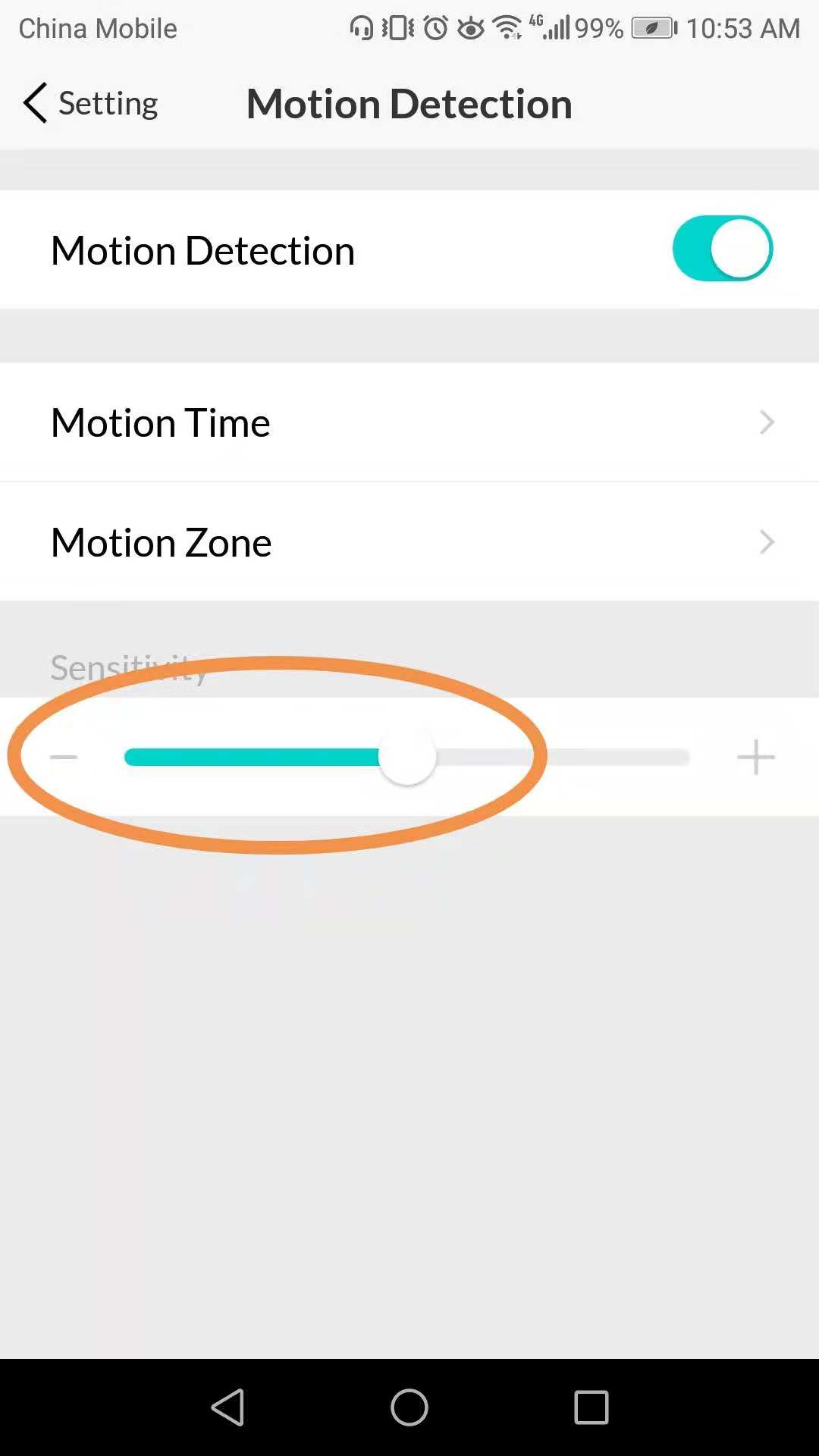
Eliminate false motion alerts by adjusting two settings: reduce PIR sensitivity from level 8 to 4, then draw detection zones excluding streets in the app. This cuts false alarms by 95% based on user reports.
Weatherproof Your Magicfly Doorbell
Extreme temperatures cause preventable failures:
Below -4°F: Standard CR2032s lose 60% capacity. Switch to lithium batteries or install the hard-wire kit MF-HW01. Never use rechargeable batteries—they can’t handle cold snaps.
Above 122°F: Direct sun cooks outdoor buttons. Relocate to a shaded area or attach a 3×3-inch aluminum heat sink plate ($2.99 on Amazon) to the back cover. This dissipates heat and prevents LED burnout.
Moisture damage requires immediate action. If the button seal is cracked, replace the entire unit (part #RSBTN-01) or apply plasti-dip as a temporary sealant. Never operate with visible moisture inside—corrosion spreads fast.
When to Repair vs Replace Your Magicfly
Save money with this decision framework:
Repair immediately if:
– Batteries or wiring cause the issue (under $10 parts)
– You need only basic components like replacement buttons ($8.99)
– The unit is under warranty (12-24 months with registration)
Replace immediately if:
– PCB shows burn marks or melted components
– Transformer failed catastrophically (smell of burnt insulation)
– Repair costs exceed $25 (half the price of new kits)
Always check warranty status first. File a ticket at support.magicfly.com with your Amazon order number—they email prepaid shipping labels within 24 hours for US/CA customers.
Magicfly Symptom Solver: 90-Second Fixes
Bookmark these rapid solutions:
– No lights with fresh batteries: Resolder resistor R3 or replace button
– Button lights but no sound: Press volume-up button 3 times
– Works only nearby: Replace receiver batteries + mount 3 feet higher
– Random ringing: Clean stuck button membrane or resync with new DIP code
Keep spare CR2032 lithium batteries and a wooden spacer in your toolkit. With these proven fixes, your Magicfly doorbell will ring reliably through blizzards, heatwaves, and neighborhood Wi-Fi chaos. When in doubt, run the 60-second diagnostic—it solves most issues before you even grab a screwdriver.



